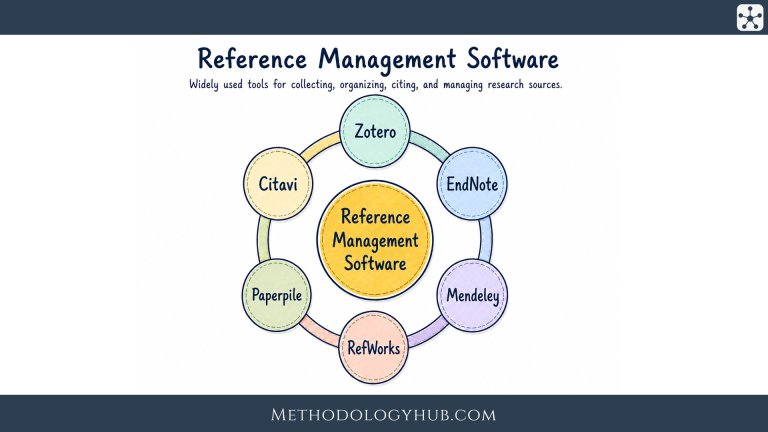
Reference Management Software

This independent overview of reference management software focuses on tools in active development and that are suitable for academic work, dissertation, collaborative research, and long-term literature management.

Our independence: MethodologyHub.com is an independent research resource. We do not develop or sell software. Our evaluations aim to provide unbiased information, with a preference for open-source tools whenever possible.

Best Tools for Reference Management Compared

Find the right tool for your research - for students, independent researchers, teams, and institutions.

BibBase

Christian Fritz · since 2005
License / modelProprietary
Based inOther
Main office / addressCanada, BibBase
Pricing$
Ease of useModerate
PlatformCloud
Student pricingFree
CategoriesReference Management
PlanFree for students; paid plan for others
Cloud syncYes
CollabNo
OSCloud
Writing integrationsLaTeX/BibTeX, Cloud sync

BibBase is a centrally hosted bibliography publishing service intended for publication pages. It is less of a full writing environment and more of a way to turn bibliographic data into a public, browsable publication list.

It is especially relevant for scholars, research groups, and labs that want to maintain publication pages from BibTeX-style data without operating a complete institutional repository or reference-management desktop application.

For day-to-day writing, BibBase fits workflows that use LaTeX and BibTeX and cloud syncing.

Student offer details A free web service is available for maintaining and embedding publication lists.

BibDesk

BibDesk developers · since 2002
License / modelOpen Source
Based inOther
Main office / addressDistributed open, source project; no single corporate headquarters
PricingFree
Ease of useModerate
PlatformDesktop
Student pricingFree
CategoriesReference Management
PlanFree open-source Mac application
Cloud syncNo
CollabNo
OSMac
Writing integrationsLaTeX/BibTeX, Browser capture, PDF management

BibDesk is free and open-source macOS reference management software designed as a BibTeX front end and bibliography repository. It fits naturally into TeX, LaTeX, and Mac desktop research workflows.

It is especially useful for Mac users who maintain BibTeX databases, attach local PDFs, search metadata, and use citation keys in technical or scholarly writing. It is more specialized than general-purpose cloud reference management software.

For day-to-day writing, BibDesk fits workflows that use LaTeX and BibTeX, browser capture, and PDF management.

Student offer details Free software, including for students.

BibSonomy

University of Kassel · since 2006
License / modelOpen Source
Based inEU
Main office / addressKassel, Germany, University of Kassel
PricingFree
Ease of useModerate
PlatformCloud
Student pricingFree
CategoriesReference Management
PlanFree centrally hosted website; open-source components
Cloud syncYes
CollabYes
OSCloud
Writing integrationsLaTeX/BibTeX, Browser capture, Cloud sync, Collaboration

BibSonomy is an academic, web-based social bookmarking and publication-management system from the University of Kassel. It focuses on collecting, tagging, sharing, and exporting bibliographic references online.

It is especially relevant for researchers and academic groups that want a hosted bibliography and bookmark-sharing environment with BibTeX/RIS-style export rather than a full desktop writing suite.

For day-to-day writing, BibSonomy fits workflows that use LaTeX and BibTeX, browser capture, cloud syncing, and collaboration.

Student offer details Free software, including for students.

Bookends

Sonny Software · since 1988
License / modelProprietary
Based inUSA
Main office / addressUnited States, Sonny Software
Pricing$
Ease of useModerate
PlatformDesktop
Student pricingFree
CategoriesReference Management
PlanOne-time purchase; Mac and mobile ecosystem
Cloud syncYes
CollabNo
OSMac, Mobile
Writing integrationsWord, LibreOffice, LaTeX/BibTeX, Browser capture, PDF management, Cloud sync

Bookends is long-running proprietary reference management software for macOS and mobile. It emphasizes local library control, iCloud syncing, integrated web search, PDF download, citation tools, and annotation workflows.

It is especially relevant for Mac-first researchers and writers who want a mature desktop application with Word integration, PDF annotation stored as notes, BibTeX support, and strong local-library habits.

For day-to-day writing, Bookends fits workflows that use Microsoft Word, LibreOffice, LaTeX and BibTeX, browser capture, PDF management, and cloud syncing.

Student offer details The free version supports up to 50 references; a paid license removes this limit.

Citavi

Lumivero · since 2006
License / modelProprietary
Based inUSA
Main office / addressDenver, Colorado, United States, Lumivero
Pricing$$
Ease of useModerate
PlatformDesktop, Cloud
Student pricingFree and discounted
CategoriesLiterature Review, Reference Management
PlanPaid plans; local, cloud, and team/database options
Cloud syncYes
CollabYes
OSWin, Cloud
Writing integrationsWord, LaTeX/BibTeX, Browser capture, PDF management, Cloud sync, Collaboration

Citavi is a proprietary reference and knowledge-management tool from Lumivero. It is known for combining reference management with task planning, quotations, notes, knowledge organization, and team access.

It is especially relevant for dissertation projects, long-form literature reviews, systematic knowledge organization, and Windows-centered research teams that need Word integration, database searching, cloud/team options, and structured note workflows.

For day-to-day writing, Citavi fits workflows that use Microsoft Word, LaTeX and BibTeX, browser capture, PDF management, cloud syncing, and collaboration.

Student offer details Students may receive free institutional access; paid individual plans and academic terms depend on the provider or institution.

EndNote

Clarivate · since 1988
License / modelProprietary
Based inOther
Main office / addressUnited Kingdom, Clarivate
Pricing$$
Ease of useModerate
PlatformCloud, Desktop
Student pricingDiscounted
CategoriesReference Management
PlanPaid desktop product; EndNote Online available
Cloud syncYes
CollabYes
OSWin, Mac, Cloud, Mobile
Writing integrationsWord, Google Docs, Browser capture, PDF management, Cloud sync, Collaboration

EndNote is long-established proprietary reference management software from Clarivate. It is widely used in universities, libraries, medical research, and institutional settings where mature citation workflows and large reference libraries matter.

It is especially relevant for researchers who need Word integration, online syncing, shared libraries, PDF handling, and broad import/export support. It is a strong traditional choice, though it is typically more commercial and institution-oriented than lightweight free tools.

For day-to-day writing, EndNote fits workflows that use Microsoft Word, Google Docs, browser capture, PDF management, cloud syncing, and collaboration.

Student offer details Student pricing and academic discounts are available through the provider or authorized academic stores.

JabRef

JabRef developers · since 2003
License / modelOpen Source
Based inOther
Main office / addressNorway, JabRef association
PricingFree
Ease of useModerate
PlatformDesktop
Student pricingFree
CategoriesReference Management
PlanFree open-source desktop application
Cloud syncNo
CollabNo
OSWin, Mac, Linux
Writing integrationsWord, LibreOffice, LaTeX/BibTeX, Browser capture, PDF management

JabRef is free and open-source reference management software built around BibTeX and BibLaTeX. It is particularly strong for LaTeX users, technical writing, reproducible bibliographies, and file-linked PDF libraries.

It is especially relevant for computer science, mathematics, engineering, physics, and other fields where BibTeX workflows are common. It offers broad import/export support, database lookup, and integrations with editors and office tools.

For day-to-day writing, JabRef fits workflows that use Microsoft Word, LibreOffice, LaTeX and BibTeX, browser capture, and PDF management.

Student offer details Free software, including for students.

KBibTeX

KBibTeX developers / KDE community · since 2005
License / modelOpen Source
Based inEU
Main office / addressGermany, KDE e.V. stewardship
PricingFree
Ease of useModerate
PlatformDesktop
Student pricingFree
CategoriesReference Management
PlanFree open-source BibTeX editor
Cloud syncNo
CollabNo
OSWin, Mac, Linux
Writing integrationsLaTeX/BibTeX, PDF management

KBibTeX is a free and open-source BibTeX editor associated with the KDE ecosystem. It is aimed at managing BibTeX files, editing entries, and supporting LaTeX-oriented bibliographies.

It is especially relevant for Linux/KDE users and technically oriented writers who primarily need BibTeX file management rather than cloud collaboration or broad office-suite integrations.

For day-to-day writing, KBibTeX fits workflows that use LaTeX and BibTeX and PDF management.

Student offer details Free software, including for students.

Mendeley Reference Manager

Elsevier · since 2008
License / modelProprietary
Based inOther
Main office / addressUnited Kingdom, Mendeley Ltd
PricingFree
Ease of useModerate
PlatformCloud, Desktop
Student pricingFree
CategoriesReference Management
PlanFree with limited online storage; paid storage available
Cloud syncYes
CollabYes
OSWin, Mac, Linux, Cloud
Writing integrationsWord, LibreOffice, Browser capture, PDF management, Cloud sync, Collaboration

Mendeley Reference Manager is Elsevier's proprietary reference management software, combining a desktop app, web library, citation plugin, browser importing, automatic syncing, and PDF-oriented organization.

It is especially relevant for students and research groups that want cloud synchronization, PDF library management, and citation insertion in Microsoft Word. It is less open than Zotero or JabRef, but remains familiar in many academic environments.

For day-to-day writing, Mendeley Reference Manager fits workflows that use Microsoft Word, LibreOffice, browser capture, PDF management, cloud syncing, and collaboration.

Student offer details A free version or plan is available to students; paid features may cost extra.

Paperpile

Paperpile LLC · since 2013
License / modelProprietary
Based inUSA
Main office / addressUnited States, Paperpile
Pricing$
Ease of useModerate
PlatformDesktop, Cloud
Student pricingDiscounted
CategoriesReference Management
PlanMonthly subscription; academic pricing available
Cloud syncYes
CollabYes
OSWin, Mac, Linux, Cloud, Mobile
Writing integrationsWord, Google Docs, Browser capture, PDF management, Cloud sync, Collaboration

Paperpile is proprietary web-based reference management software built around Google-oriented workflows. It runs primarily in the browser and emphasizes fast capture, PDF management, syncing, and simple citation insertion.

It is especially useful for researchers, students, labs, and writing teams that live in Google Docs or want a browser-first tool. It also supports Word workflows and mobile access, making it attractive for cloud-first academic writing.

For day-to-day writing, Paperpile fits workflows that use Microsoft Word, Google Docs, browser capture, PDF management, cloud syncing, and collaboration.

Student offer details Academic discounts include students at accredited universities; eligibility conditions apply.

Papers / ReadCube Papers

ReadCube · since 2011
License / modelProprietary
Based inUSA
Main office / addressUnited States, ReadCube
Pricing$
Ease of useModerate
PlatformDesktop, Cloud
Student pricingDiscounted
CategoriesLiterature Review, Reference Management
PlanMonthly subscription with student/academic plans
Cloud syncYes
CollabYes
OSWin, Mac, Cloud, Mobile
Writing integrationsWord, Google Docs, PDF management, Cloud sync, Collaboration

Papers, also known as ReadCube Papers, is proprietary reference management software focused on literature discovery, PDF organization, annotation, syncing, and writing integrations across desktop, web, and mobile devices.

It is especially relevant for biomedical, scientific, and graduate research workflows where PDF reading, annotations, shared libraries, and citation insertion in Word or Google Docs are important.

For day-to-day writing, Papers / ReadCube Papers fits workflows that use Microsoft Word, Google Docs, PDF management, cloud syncing, and collaboration.

Student offer details Academic pricing is available with an eligible academic email address or ID.

refbase

refbase developers · since 2003
License / modelOpen Source
Based inOther
Main office / addressCommunity project; no single corporate headquarters
PricingFree
Ease of useModerate
PlatformSelf-hosted
Student pricingFree
CategoriesReference Management
PlanFree open-source web application
Cloud syncYes
CollabYes
OSWin, Mac, Linux, Cloud
Writing integrationsLibreOffice, LaTeX/BibTeX, Cloud sync, Collaboration

refbase is a free and open-source web-based reference database for institutional repositories and self-archiving. It is more infrastructure-oriented than personal-reference-manager tools.

It is especially relevant for libraries, departments, research groups, and repository administrators who want a web-based bibliographic database with export formats and collaborative access, rather than a polished personal desktop app.

For day-to-day writing, refbase fits workflows that use LibreOffice, LaTeX and BibTeX, cloud syncing, and collaboration.

Student offer details Free software, including for students.

RefWorks

Ex Libris / ProQuest / Clarivate · since 2001
License / modelProprietary
Based inOther
Main office / addressUnited Kingdom, Clarivate, parent provider
Pricing$$$
Ease of useModerate
PlatformDesktop, Cloud
Student pricingFree and discounted
CategoriesReference Management
PlanInstitutional subscription
Cloud syncYes
CollabYes
OSWin, Mac, Cloud
Writing integrationsWord, Google Docs, Cloud sync, Collaboration

RefWorks is proprietary web-based reference management software commonly provided through university, library, and institutional subscriptions. It focuses on browser access, shared research workflows, and managed citation writing tools.

It is especially relevant for institutions that want a centrally supported reference tool with Word and Google Docs workflows, broad import support, and a web interface for students and faculty.

For day-to-day writing, RefWorks fits workflows that use Microsoft Word, Google Docs, cloud syncing, and collaboration.

Student offer details Access is commonly provided through institutional subscriptions; students should check their library or institution.
Zotero

Corporation for Digital Scholarship · since 2006
License / modelOpen Source
Based inUSA
Main office / addressUnited States, Corporation for Digital Scholarship
PricingFree
Ease of useModerate
PlatformCloud, Desktop
Student pricingFree
CategoriesLiterature Review, Reference Management
PlanFree; paid online storage available
Cloud syncYes
CollabYes
OSWin, Mac, Linux, Cloud, Mobile
Writing integrationsWord, Google Docs, LibreOffice, LaTeX/BibTeX, Browser capture, PDF management, Cloud sync, Collaboration

Zotero is free and open-source reference management software developed by the Corporation for Digital Scholarship. It combines desktop apps, browser connectors, web access, syncing, group libraries, and mobile support for collecting and organizing sources.

It is especially useful for students, researchers, humanities scholars, social scientists, librarians, and writing teams that want a flexible workflow with strong browser capture, Word and LibreOffice plugins, Google Docs support, BibTeX-oriented workflows through export/plugins, and CSL citation styles.

For day-to-day writing, Zotero fits workflows that use Microsoft Word, Google Docs, LibreOffice, LaTeX and BibTeX, browser capture, PDF management, cloud syncing, and collaboration.

Student offer details Free software, including for students.

Most Used Reference Management Software

Methodology Hub’s Recommendations for Reference Management Software

Zotero leads our reference management software recommendations. It collects sources, organises and annotates PDFs, inserts citations into common writing applications and supports shared libraries. EndNote and Paperpile are our leading paid alternatives for researchers who prefer their respective library and writing workflows. JabRef deserves particular attention when BibTeX or biblatex files are central to the project.

A reference manager should make it easier to retrieve the right source and cite it accurately. Someone writing a literature review may need to sort hundreds of papers and retain reading notes; a student preparing one essay may chiefly need reliable citations and a bibliography. The rankings below reflect those different jobs.

How We Compare

We compare the software on the work researchers actually do with references: importing, checking, reading, organising, sharing and citing them.

  • Open source and open research: We favour software whose code can be inspected and whose references can be exported in reusable formats. An open licence is valuable when the tool also handles the intended writing and collaboration tasks.
  • Cost and continued access: We consider subscriptions, attachment-storage limits, team plans and whether researchers can keep using their library after graduation or a licence change.
  • Development and long-term support: We look for maintained software, documentation and a sustainable project or organisation, rather than relying on an unreviewed prototype or one unsupported developer.
  • Fit with the writing workflow: Word, Google Docs, LibreOffice and LaTeX users need different citation integrations. We also consider whether the tool suits occasional essays, long manuscripts or continuing literature searches.
  • Reference management functions: Useful features include browser capture, metadata correction, duplicate handling, PDF annotation, search, citation styles and shared collections. Extra features count when they solve a real research task.
  • Protection of research material: We examine where PDFs and notes are stored, who can access shared libraries and what cloud processing the chosen features require.
  • Traceability and portability: Researchers should be able to revisit source details, reading notes and citation decisions. Exports matter when a library has to move between tools or institutions.
  • Usability: Importing a source, correcting a record and inserting a citation should be understandable. Collaboration controls should make it clear who can see or change a shared collection.

Our independence: MethodologyHub.com is an independent research resource. We do not develop or sell software, receive commissions or earn affiliate revenue. We prefer open-source tools when their functions meet the research requirement.

Best Overall Reference Management Software

Zotero is our first overall choice because it covers the main reference management tasks across several writing environments. EndNote follows for extensive library and citation work; Paperpile takes third for its browser-based workflow.

  1. Zotero: Best overall. Capture references from the browser, correct their details, attach and annotate PDFs, then cite in Word, LibreOffice or Google Docs. Collections, tags and saved searches help manage a growing research library. We rank Zotero first for this combination of functions, free open-source software and shared group libraries. The free online attachment allowance is limited; larger synced PDF collections may need paid storage.

  2. EndNote: For substantial manuscript and library work. EndNote brings reference records, PDFs, groups and citation styles into a long-established desktop workflow. Its citation integrations and shared-library permissions support collaborative manuscripts. We place it second for these functions, especially when authors need to maintain a large collection through repeated revisions. Licensing costs and the way a shared library is synced should be part of the choice.

  3. Paperpile: For browser-centred reading and writing. Paperpile combines web importing, PDF annotation, organised libraries and citations in Word and Google Docs. Shared libraries let collaborators collect and review sources together. It ranks third because that integrated workflow is particularly convenient for researchers working in a browser, while the subscription and account requirements make Zotero the stronger general default.

Other alternatives include JabRef for BibTeX and biblatex libraries, Citavi for source-linked notes and outlines, and ReadCube for shared reading and literature monitoring. Their relative value depends on how the research team writes and uses its sources.

Best Open Source Reference Management Software

Zotero ranks first among open-source reference managers for general research. JabRef takes second for BibTeX-focused writing, followed by BibDesk for researchers using a Mac and LaTeX.

  1. Zotero: For research across writing applications. Its browser connector, PDF reader, notes, citations and group libraries cover most everyday requirements without a software licence. Researchers can move bibliographic records between tools through common export formats. Zotero leads because the same library can support individual writing, teaching and collaborative research. Online PDF storage is a separate consideration from the free application.

  2. JabRef: For BibTeX and biblatex control. JabRef works directly with .bib libraries, letting authors inspect and edit entries, identifiers, citation keys and links to local files. This makes it especially useful for LaTeX manuscripts and projects that keep bibliography files alongside their writing files. We rank it second for general users, but first when the BibTeX file itself is the main working library.

  3. BibDesk: For Mac-based BibTeX libraries. BibDesk manages bibliographic entries and associated files in a desktop interface designed around BibTeX. It offers a free open-source route to organising references for LaTeX writing. Its Mac focus makes it a narrower third-place choice than Zotero or cross-platform JabRef.

Further open-source alternatives include KBibTeX for KDE-based BibTeX editing. The open-source ranking stays focused on full reference-management workflows: BibTeX editors can be excellent for a LaTeX project without replacing Zotero’s broader browser capture, document citation and group-library functions.

Best Reference Management Software for Students

Zotero comes first for students who need one library for coursework and later research. Mendeley follows for free PDF reading and Word citations, with Paperpile third for those who write primarily in Google Docs or Word.

  1. Zotero: For essays through dissertations. A student can save sources while searching, sort them by assignment, mark up PDFs and insert citations without buying the desktop software. Word, LibreOffice and Google Docs support lets the library continue across courses and writing tools. We favour it for that flexibility and continued access after graduation. Students who sync many PDFs should check attachment-storage limits.

  2. Mendeley Reference Manager: For reading PDFs and citing in Word. Students can keep references and papers together, highlight and annotate readings, and use Mendeley Cite while drafting in Word. We place it second for this accessible free workflow. It is proprietary software, and free cloud storage has limits, so the ability to export references remains worth checking before building a long-term library.

  3. Paperpile: For a browser-based citation workflow. Saving papers, reading PDFs and inserting citations into Google Docs or Word can happen within a connected online workspace. This is useful for students who frequently change devices or collaborate on documents. Paperpile ranks third because the subscription needs justification against the capable free choices above.

JabRef, BibDesk and Bookends are additional alternatives. JabRef suits LaTeX-heavy coursework, BibDesk is an open-source Mac option for BibTeX, and Bookends offers another Mac reference-management workflow. Students should choose a tool that works with the editor their course actually requires.

Best Reference Management Software for Educational Institutions

Zotero leads for teaching and research across departments. EndNote follows for institutionally licensed reference management, while Citavi takes third where research projects need structured reading notes and tasks alongside citations.

  1. Zotero: For campus-wide research and teaching. Students and staff can collect sources, cite in different writing applications and create group libraries for classes or projects. Its open-source desktop software removes the need for every user to obtain a software licence. We rank it first for that reach. Institutions with extensive shared PDF collections should plan for group-library attachment storage and permissions.

  2. EndNote: For departments needing a licensed desktop reference manager. Library organisation, citation formatting, PDF handling and shared references support theses and research manuscripts. An institution can provide a common tool for staff and students who work in EndNote-compatible writing environments. We place it second because those functions are substantial, while licence terms and access after leaving the institution need clear consideration.

  3. Citavi: For structured research writing. Citavi connects citations to quotations, comments, categories and an outline, helping writers move from reading to a draft. Project tasks and sharing add value to longer theses and collaborative studies. We rank it third for this richer approach to organising ideas. Its Word integration is more direct than its Google Docs workflow, which relies on copying formatted references.

EndNote Fusion (formerly RefWorks), Paperpile and JabRef are further alternatives. EndNote Fusion centres on institution-managed online reference collections, Paperpile suits browser-based writing, and JabRef gives LaTeX courses an open-source BibTeX manager. The institution should compare the writing tools used across its departments before selecting a single default.

Best Reference Management Software for Business and B2B

ReadCube leads this ranking for businesses that collect, monitor and distribute research literature across teams. Citavi follows for turning sources into organised evidence and reports. Zotero is third for businesses whose main need is a shared reference library and citations.

  1. ReadCube (formerly Papers): For shared literature and monitoring. Teams can maintain reference and PDF collections, share annotations and track newly published material relevant to their work. This goes beyond formatting a bibliography: research groups can keep a common collection current across projects. Those functions put ReadCube first for this category. Check the selected plan for the shared-library permissions and monitoring features the organisation needs.

  2. Citavi: For source-based reports and research tasks. Staff can link quotations and comments to their sources, group them into an outline and track work in a project. Shared projects and storage options support teams producing documented reviews or reports. Citavi takes second because those functions connect reference management to the actual writing and coordination work.

  3. Zotero: For accessible shared bibliographies. Private groups can keep references and permitted files together for colleagues drafting reports or reviewing a subject. Browser capture, notes and citations cover the core tasks without a per-user application licence. We place it third because businesses needing automated literature monitoring or formal task management may need the extra functions of the first two tools.

EndNote, Paperpile and Mendeley are other alternatives. EndNote serves shared manuscript libraries, Paperpile supports browser-based reference work, and Mendeley covers reading and citing from a synced collection. The cost of a paid system is justified here by the specific literature workflow it adds, not by its commercial licence alone.

Best Reference Management Software for Research Teams

Zotero ranks first for teams building shared research libraries. ReadCube follows when colleagues also need shared annotations and literature monitoring, while EndNote takes third for groups preparing manuscripts from a shared reference collection.

  1. Zotero: For collaborative bibliographies. Private groups let collaborators add, organise and cite from a common collection, while keeping it separate from personal libraries. Researchers can control group membership and whether files are shared. We rank it first because these functions work without charging each member for the software. The group owner’s storage allocation matters if the team syncs many PDFs.

  2. ReadCube (formerly Papers): For coordinated reading. Shared libraries bring articles, annotations and reading lists into a common research space. Teams can also monitor relevant publications instead of circulating separate search results. It takes second for that combination. Access roles vary by plan, so teams should verify which members can add sources, change the library and manage sharing.

  3. EndNote: For co-authors using a shared library. EndNote permits authorised collaborators to work with shared references, attachments and groups, with read-only or editing access. Its citation tools then support manuscript preparation. We rank it third for the established shared-library workflow, while recognising that each collaborator’s software access and the library’s sync setup must be arranged.

Paperpile, Citavi and BibSonomy offer further alternatives for research teams. Paperpile has shared libraries and PDF annotations, Citavi adds project tasks and source-linked notes, and BibSonomy supports collaborative collections of publications and bookmarks. A shared folder is useful only when the team also agrees how to correct records and retain the evidence behind its citations.

Find and compare more research software

Compare the most-used and actively maintained research software and academic tools. Explore software solutions for working with scholarly sources and research data, with an emphasis on practical academic workflows, research methods, collaboration, and software features.

Content Analysis Software

Compare tools for coding material, counting categories, and finding patterns across research documents.

Compare tools

Literature Review Software

Explore tools for searching, screening studies, extracting evidence, and organizing reviews.

Compare tools

Mixed Methods Software

Find tools that bring qualitative evidence and numerical data together for integrated analysis.

Compare tools

Qualitative Data Analysis Software

Compare software for coding interviews, field notes, documents, and other qualitative material.

Compare tools

Reference Management Software

Find tools for organizing sources, managing citations, and maintaining a research library.

Compare tools

Statistical Software

Compare options for data analysis, statistical modelling, and reproducible research workflows.

Compare tools

Text Analysis Software

Explore tools for examining word use, language patterns, and large collections of text.

Compare tools

Thematic Analysis Software

Compare tools for developing themes and tracing interpretations across qualitative data.

Compare tools

Transcription Software

Find tools for turning interviews, focus groups, and recordings into editable transcripts.

Compare tools

Writing Assistant Software

Compare tools that support drafting, editing, collaboration, and academic writing.

Compare tools